
Reviewed 24/11/2026
How Tickets Begin with Fae
Phase 6 — Tickets & PSA Workflow · OpenFrame Onboarding
Most tickets in OpenFrame don't start with a technician — they start with Fae, your clients' AI IT assistant. Before a ticket ever lands on your board, Fae has usually already talked to the client, pulled the device's real health data, and tried the safe fixes. This guide explains what happens on the client side so you understand exactly what a ticket has been through by the time it reaches you.
Quick steps
- Deploy the OpenFrame agent. Fae appears on the client's machine automatically.
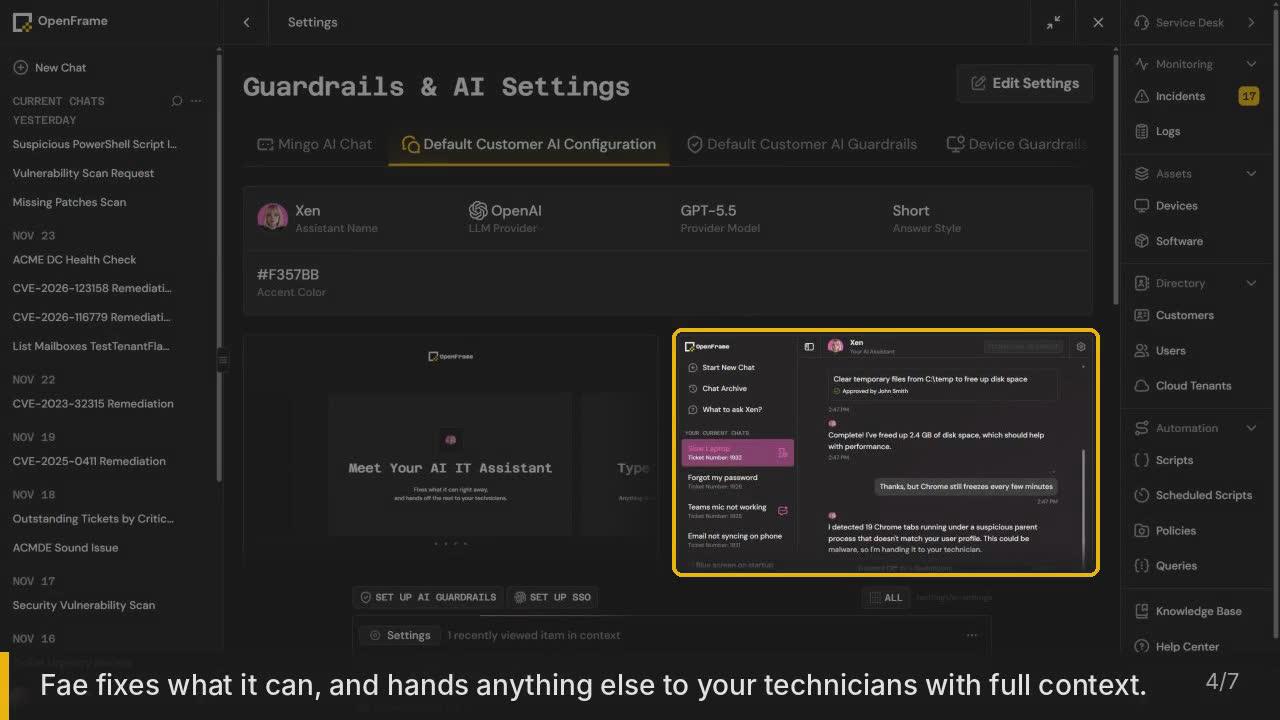
- Set Fae's name, look and behaviour in Settings → Guardrails & AI Settings → Default Customer AI Configuration.
- Set what Fae may do on devices in Default Customer AI Guardrails.
- Watch tickets arrive on Service Desk → Tickets with Fae's conversation attached.
Where Fae comes from
Fae is the client-facing counterpart to Mingo (your technician-facing AI). The moment the OpenFrame agent is deployed to a machine, the Fae chat appears on the client's screen — it's their client portal, branded as "Your IT is managed by [Your MSP]." From then on, Fae is their first line of support: they're meant to ask Fae before anything else.
You configure Fae's branding and behavior under Settings → Guardrails & AI Settings → Default Customer AI Configuration (its name, model, answer style, accent color and quick actions; any customer can override these on its own Customer AI Configuration tab), while what Fae is allowed to do on a device is governed by Default Customer AI Guardrails (see AI Guardrails & Approval Policies, Phase 9).
What the client sees
The portal is deliberately simple — no forms, no category trees to navigate:
- A prompt: "Hey! How can I help? Describe what's happening and I'll take a look."
- An "Enter your request here…" box where the client types the problem in plain language.
- Quick-start chips that rotate through common issue types — Hardware Repairs & Swaps, VPN & Wi-Fi Issues, Password, Printer & Peripheral Fixes, Calendar & Delegation Setup, "How do I…" questions, and more — to nudge them if they're not sure how to start.
- "Your Chats" — a list of their past conversations. Each one is a ticket, shown with its number and current status (e.g. AI Assistance).
What Fae actually does
This is where Fae earns its keep. When a client describes a problem, Fae doesn't just chat — it works the issue against the device's live data:
- It reads the machine. Fae correlates the complaint with real telemetry — CPU, memory and swap pressure, uptime, running processes. (A "my computer is slow" turns into "Cap.app was eating 64% CPU, memory is nearly exhausted with heavy swap activity, and you have 29 days of uptime.")
- It proposes and runs safe fixes. Fae lays out the most confident fixes with the least risk and executes them, showing each command transparently and checking it off as it completes. What it can run on its own — versus what pauses for approval — is exactly what your AI Guardrails decide (Phase 9).
- It reports back in plain language. After each step Fae tells the client what changed ("Cap.app is closed. Memory is still very tight…") and continues if there's more it can safely try.
Many issues are fully resolved right here, in the AI Handling stage, without a technician ever touching them.
How a ticket reaches your board
There are three ways a Fae conversation turns into work on your side:
- Fae escalates it. When Fae hits the limit of what it can safely resolve — or an action needs a human — it hands off. The client sees "Waiting for Technician Response," and the ticket moves into your board at the Tech Required stage.
- The client escalates it themselves. At the top of the portal there's a Create Ticket button. If a client would rather go straight to a person, they can open a ticket directly without waiting for Fae to give up. On your board, these show Escalated by User.
- The conversation goes quiet. If there are no new messages for an extended period, OpenFrame hands the conversation to a technician automatically (Handed Off to a Technician), so nothing stalls.
Either way, what arrives on your Tickets board isn't a blank complaint — it's a ticket carrying the full Fae conversation, the device context Fae gathered, and a record of everything it already tried. You pick up with Mingo in the chat beside the ticket (see Using Mingo AI in a Ticket Chat).
Why this matters for your techs
Fae changes the shape of your queue. By the time a ticket reaches a technician, the easy stuff is often already handled, and the hard stuff arrives pre-triaged with context — you're not starting from "it's slow," you're starting from "Cap.app was the culprit, memory's still tight, here's what's been tried." That's less time gathering basics and more time on the actual fix.
The lever you control is the Guardrails: tighten them and Fae asks before acting (more approval cards for you); loosen them and Fae resolves more on its own (fewer tickets reach you). Tune that deliberately in AI Guardrails & Approval Policies (Phase 9).
Common questions
What is Fae? OpenFrame's client-facing AI IT assistant. It chats with your clients' end users on their machines, gathers details, tries safe fixes and opens tickets when a technician is needed.
Does OpenFrame have an end-user portal? Yes. Fae is the client portal: a chat on the user's machine, branded with your company name.
How do end users raise a ticket? They describe the problem to Fae in plain language. Fae works on it and creates a ticket if it needs a technician.
Can I brand Fae with my MSP's name? Yes. Set its name, accent colour, answer style and quick actions under Default Customer AI Configuration. Each customer can override them.
Can Fae fix things on a user's computer? Only what your guardrails allow. Gated actions wait for a technician's approval.
What is the difference between Fae and Mingo? Fae talks to your clients. Mingo works with your technicians.
Quick checklist
- Understood that Fae appears on the client's device once the agent is deployed and is their portal
- Knew clients are meant to ask Fae first, describing the problem in plain language
- Saw that Fae reads device telemetry and runs safe fixes in the AI Handling stage
- Knew the routes to a ticket: Fae escalates ("Waiting for Technician Response"), the client clicks Create Ticket, or a quiet conversation is handed off automatically
- Understood a ticket arrives pre-triaged, with the Fae conversation and device context attached
- Knew Guardrails (Phase 9) control how much Fae does on its own
What's next
Now that you know where tickets come from, see how they move across your board in Ticket Lifecycle — From Open to Resolved, and how you work them with your AI assistant in Using Mingo AI in a Ticket Chat.
Checked against OpenFrame 1.7 (November 2026). Fae's portal and behavior are actively evolving between releases — what's in your console (and your Customer AI Configuration settings) wins.