
Integration
Integration is where you connect OpenFrame to your customers' Microsoft 365 and Google Workspace tenants. Once a tenant is connected, you can look up users, groups and licenses, and for Microsoft 365, make changes, all through Mingo.
Navigate to: Navigation menu → Directory → Cloud Tenants
Good to know: The Cloud Tenant Management page lists your connected tenants with their Customers, Licences (assigned and unused) and Access (e.g. WRITE ENABLED, and when it was last read). Changes inside a tenant — users, groups — are made through Mingo: ask in plain language and it will work with the connected tenant for you.
Quick steps
- Open the navigation menu → Directory → Cloud Tenants and click Connect Tenant.
- Choose Microsoft 365 or Google Workspace, enter the customer's domain and a connection name.
- Click Generate Connection Link and have the customer's administrator approve it, then Save Integration.
- Ask Mingo about the tenant's users, groups and licences.
Add a New Tenant Integration
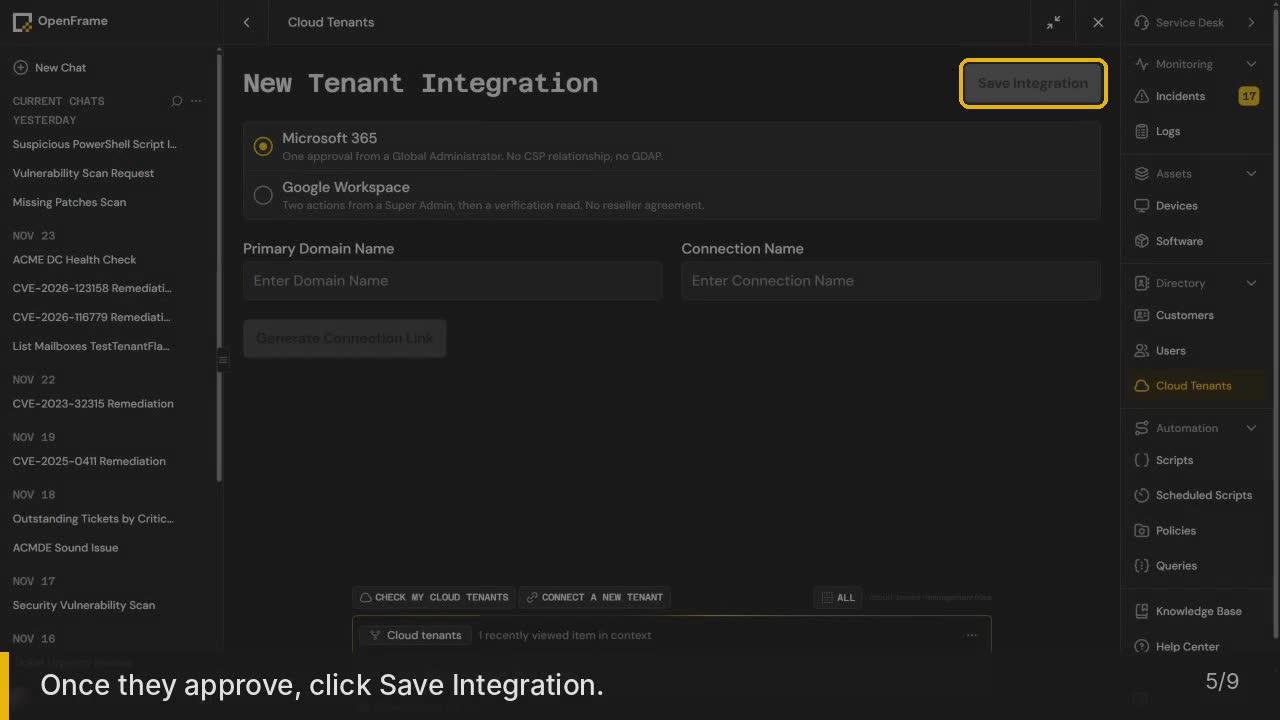
Click Connect Tenant. On New Tenant Integration:
- Choose the provider:
- Microsoft 365 — one approval from a Global Administrator. No CSP relationship, no GDAP.
- Google Workspace — two actions from a Super Admin, then a verification read. No reseller agreement.
- Primary Domain Name: The customer's tenant domain name.
- Connection Name: Any label that helps you recognise the connection.
- Click Generate Connection Link and have the customer's administrator complete the approval, then Save Integration.
Expected result: The tenant appears in the Cloud Tenants list. Open it to see the provider, the Customers it's attached to, user count, status, the Scopes held (e.g. users, groups, licences, devices, audit logs), who granted it, and its licences. Use Edit Integration to change it later.
If the page shows a banner asking you to re-authorize your Microsoft 365 tenants, do it: newer features (such as last sign-in dates) stay unavailable until you do.
Microsoft 365 / Entra (Read + Write)
Connections and Consent
- View connections: See every connection for a customer, with its status, consent tiers, whether writes are enabled, and sync health.
- Create and attach connections: Create a new connection for a customer, or attach an existing connection to another customer.
- Grant consent: Start the admin-consent flow for each consent tier: CORE, AUDIT, WRITE and ROLES.
- Update settings: Change the connection name, sync toggles, and whether the connection is enabled or write-enabled. Enabling writes and disabling a connection both require technician approval.
Users
- Search and view users: See full live details for any user, including profile, admin and directory roles, licenses, app assignments and group memberships.
- Create users: Mingo returns a one-time temporary password for the new user.
- Update profiles: Change fields such as name and job title.
- Enable or disable sign-in: Disabling sign-in requires approval.
Groups
- List groups: View every group and its live membership roster.
- Create groups: Create Security or Microsoft 365 groups.
- Update groups: Change a group's name or description.
- Manage members: Add or remove members. Removing members requires approval.
- Delete groups: Requires approval.
Google Workspace (Read-Only)
- Search and view users: See full details for any user, including profile, licenses, OAuth app grants and group memberships.
- List groups: View every group with live member counts, and see any group's live roster.
- View licenses: List license assignments across the organisation or by SKU.
Key Differences and Limits
| Microsoft 365 / Entra | Google Workspace | |
|---|---|---|
| Access | Read and write | Read-only |
| Making changes | Requires the WRITE consent tier to be granted and the connection to be write-enabled | Not available |
| Approvals | Sensitive actions (disabling users or connections, removing members, deleting groups, enabling writes) require technician approval | Not applicable |
Common questions
Does OpenFrame integrate with Microsoft 365? Yes. Connect a customer's tenant under Directory → Cloud Tenants to look up and change users, groups and licences through Mingo.
Does OpenFrame integrate with Google Workspace? Yes, read-only: look up users, groups and licences.
Do I need CSP or GDAP to connect Microsoft 365? No. One approval from the customer's Global Administrator is enough.
Do I need a reseller agreement for Google Workspace? No. A Super Admin approves the connection.
Can I reset a user's password or manage groups in Microsoft 365? Changes inside a connected Microsoft 365 tenant are made through Mingo. Ask in plain language, within the consent you granted.
Where do I see a customer's Microsoft 365 users? On the customer's Users and Groups tabs, or ask Mingo.
Can I see unused licences? Yes. Cloud Tenant Management shows assigned and unused licences per tenant.
Need Help?
Ask Mingo: "Show me all users in [customer]'s Microsoft 365 tenant" or "Which licenses are assigned in [customer]'s Google Workspace?" The Cloud Tenants page also has Check my cloud tenants and Connect a new tenant quick actions.
🚀 You're ready to start managing your customers' Microsoft 365 and Google Workspace tenants in OpenFrame!